
Console Command Reference
The NanoVNA-F V3 accepts 28 ASCII commands over its USB serial interface. Commands can be sent from any serial terminal (PuTTY, screen, minicom) or programmatically from scripts.
For connection setup, see the Console Commands how-to guide.
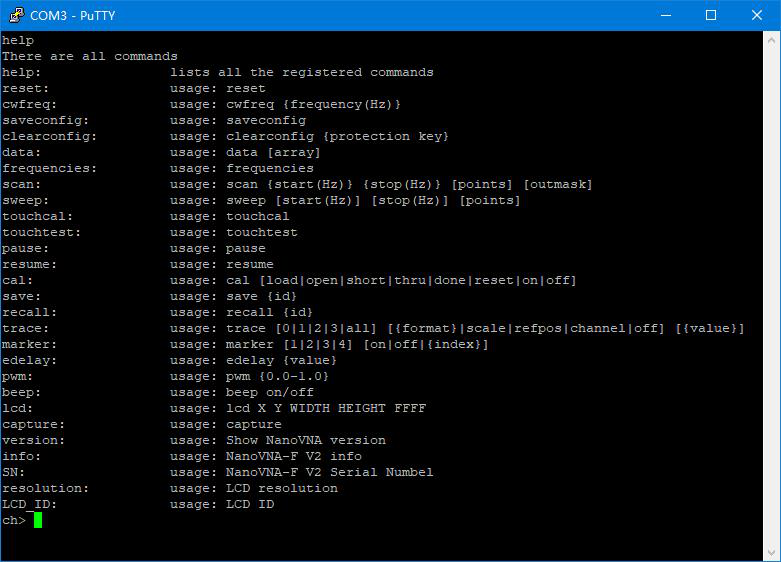
Command Summary
Section titled “Command Summary”| Command | Syntax | Description |
|---|---|---|
help | help | List all registered commands |
reset | reset | Reset the device (USB disconnects) |
cwfreq | cwfreq {freq} | Set CW pulse frequency in Hz |
saveconfig | saveconfig | Save language and touch calibration |
clearconfig | clearconfig 1234 | Factory reset (all data lost) |
data | data [0|1] | Get measurement data (0=S11, 1=S21) |
frequencies | frequencies | Get sweep frequency list |
scan | scan {start} {stop} [points] [outmask] | Scan and output data (outmask 0-7) |
sweep | sweep [start] [stop] [points] | Set sweep parameters |
touchcal | touchcal | Calibrate the touchscreen |
touchtest | touchtest | Test touch panel input |
pause | pause | Pause the sweep |
resume | resume | Resume the sweep |
cal | cal [load|open|short|thru|done|reset|on|off] | Calibration commands |
save | save [id] | Save state to slot (0-6) |
recall | recall [id] | Recall state from slot (0-6) |
trace | trace [0-3|all] [format|scale|refpos|channel|off] [value] | View or set trace attributes |
marker | marker [1-4] [on|off|{index}] | View or set marker attributes |
edelay | edelay [value] | Set electrical delay in nanoseconds |
pwm | pwm {0.0-1.0} | Set screen brightness (0=off, 1=full) |
beep | beep on/off | Test the buzzer |
lcd | lcd {X} {Y} {W} {H} {color} | Fill rectangle on LCD (16-bit hex RGB) |
capture | capture | Get screenshot (hex, 800x480, little-endian) |
version | version | Get firmware version string |
info | info | Get device information |
SN | SN | Get 16-bit serial number |
resolution | resolution | Get LCD resolution |
LCD_ID | LCD_ID | Get LCD controller ID |
Detailed Command Reference
Section titled “Detailed Command Reference”Lists all registered commands.
helpNo parameters. Returns the full command list with brief descriptions.
Resets the device. The USB connection will drop, so you must reconnect your serial terminal afterward.
resetcwfreq
Section titled “cwfreq”Sets the CW pulse frequency. In this mode PORT1 outputs a pulsed signal, not a continuous wave.
cwfreq {frequency_hz}Parameters:
| Parameter | Required | Description |
|---|---|---|
frequency_hz | Yes | Frequency in Hz |
Example:
cwfreq 450000000Sets the CW pulse frequency to 450 MHz.
saveconfig
Section titled “saveconfig”Saves language setting and touchscreen calibration data to persistent storage.
saveconfigclearconfig
Section titled “clearconfig”Restores the device to factory settings. Requires the safety parameter 1234.
clearconfig 1234Returns complex measurement data (real and imaginary parts) for each sweep point.
data [0|1]Parameters:
| Parameter | Required | Default | Description |
|---|---|---|---|
0 or 1 | No | 0 | 0 = S11 data, 1 = S21 data |
Output is one line per sweep point, each containing a real and imaginary floating-point value separated by a space.
frequencies
Section titled “frequencies”Returns the frequency of each sweep point, one per line, in Hz.
frequenciesUseful for correlating data output with specific frequencies.
Performs a sweep with the given parameters and outputs measurement data according to the output mask.
scan {start_hz} {stop_hz} [points] [outmask]Parameters:
| Parameter | Required | Default | Description |
|---|---|---|---|
start_hz | Yes | — | Start frequency in Hz |
stop_hz | Yes | — | Stop frequency in Hz |
points | No | Current | Number of sweep points |
outmask | No | 0 | Bitmask controlling output (see table) |
Output mask values:
| Mask | Output Fields |
|---|---|
0 | No data output (sweep only) |
1 | Frequency |
2 | S11 data |
3 | Frequency + S11 |
4 | S21 data |
5 | Frequency + S21 |
6 | S11 + S21 |
7 | Frequency + S11 + S21 |
Example:
scan 200000000 500000000 11 7Sweeps 200 MHz to 500 MHz with 11 points, outputting frequency, S11, and S21 data.
Sets sweep parameters without triggering an immediate data output. Two usage forms are available.
Form 1: Set start, stop, and points directly
sweep [start_hz] [stop_hz] [points]Form 2: Set a single parameter by name
sweep [start|stop|span|center|cw|points] [value]Examples:
sweep 200000000 500000000 78sweep start 200000000sweep center 350000000sweep points 201When called with no arguments, sweep returns the current sweep configuration.
touchcal
Section titled “touchcal”Initiates touchscreen calibration. A crosshair appears that you must tap accurately (use a stylus).
touchcaltouchtest
Section titled “touchtest”Enters touchscreen test mode. Touch anywhere to verify coordinates are reported correctly. Press any physical button to exit.
touchtestPauses the sweep. The display freezes at the last completed sweep.
pauseresume
Section titled “resume”Resumes the sweep after a pause command.
resumeManages calibration via the console. When called without parameters, returns the current calibration status string.
cal [load|open|short|thru|done|reset|on|off]Parameters:
| Parameter | Description |
|---|---|
| (none) | Print current calibration status |
open | Perform open calibration |
short | Perform short calibration |
load | Perform load calibration |
thru | Perform through calibration |
done | Finalize calibration (compute coefficients) |
reset | Clear calibration data from memory |
on | Apply calibration correction |
off | Remove calibration correction |
Calibration sequence:
cal resetcal opencal shortcal loadcal thrucal donesave 0Saves calibration data, trace settings, and marker table position to a storage slot.
save [id]Parameters:
| Parameter | Required | Description |
|---|---|---|
id | No | Slot number, 0 through 6 |
recall
Section titled “recall”Recalls a previously saved state from a storage slot.
recall [id]Parameters:
| Parameter | Required | Description |
|---|---|---|
id | No | Slot number, 0 through 6 |
Views or modifies trace attributes. When called with no arguments, returns the attributes of all active traces.
trace [0|1|2|3|all] [{format}|scale|refpos|channel|off] [value]Format values: logmag, phase, delay, smith, smithrlc, swr, polar, linear, real, imag, resistance, reactance, qfactor
Examples:
trace # Show all trace attributestrace 0 # Show trace 0 attributestrace 0 swr # Set trace 0 format to SWRtrace all off # Turn off all tracestrace 0 scale 15 # Set trace 0 scale to 15 dB/divtrace 1 refpos 5 # Set trace 1 reference position to 5trace 0 channel 1 # Set trace 0 to S21 (0=S11, 1=S21)marker
Section titled “marker”Views or modifies marker attributes. When called with no arguments, returns the attributes of all active markers.
marker [1|2|3|4] [on|off|{index}]Parameters:
| Parameter | Description |
|---|---|
1-4 | Marker number |
on | Enable the marker |
off | Disable the marker |
{index} | Move marker to the given sweep point index |
Examples:
marker # Show all marker attributesmarker 1 # Show marker 1 attributesmarker 1 off # Turn off marker 1marker 1 56 # Move marker 1 to sweep point 56edelay
Section titled “edelay”Sets the electrical delay compensation in nanoseconds. Used to de-embed cable or connector delay from phase measurements.
edelay [value]Example:
edelay -0.1Sets the delay to -0.1 ns (-100 ps).
Adjusts the LCD backlight brightness.
pwm {0.0-1.0}Parameters:
| Parameter | Required | Description |
|---|---|---|
| brightness | Yes | 0.0 (off) to 1.0 (full brightness) |
Example:
pwm 0.85Sets brightness to 85%.
Tests the buzzer.
beep on/offDraws a filled rectangle on the LCD screen. Useful for testing or custom display overlays.
lcd {X} {Y} {WIDTH} {HEIGHT} {color}Parameters:
| Parameter | Description |
|---|---|
| X | Horizontal position (pixels from left) |
| Y | Vertical position (pixels from top) |
| WIDTH | Rectangle width in pixels |
| HEIGHT | Rectangle height in pixels |
| color | 16-bit RGB color in hexadecimal (RGB565 format) |
Example:
lcd 100 100 50 50 F800Draws a red 50x50 square at position (100, 100). F800 is pure red in RGB565.
Common RGB565 colors:
| Color | Hex Value |
|---|---|
| Red | F800 |
| Green | 07E0 |
| Blue | 001F |
| White | FFFF |
| Black | 0000 |
| Yellow | FFE0 |
capture
Section titled “capture”Transmits a full screenshot as raw pixel data. Data is hexadecimal, little-endian, 16 bits per pixel, at 800 x 480 resolution.
captureversion
Section titled “version”Returns the firmware version string.
versionReturns device information including hardware revision, firmware version, and build details.
infoReturns the unique 16-bit serial number assigned to the device.
SNresolution
Section titled “resolution”Returns the LCD resolution (800 x 480 for the NanoVNA-F V3).
resolutionLCD_ID
Section titled “LCD_ID”Returns the LCD controller identification string.
LCD_ID