
Virtual Keyboard
Whenever the NanoVNA-F V3 needs a numeric value — frequency, scale, reference position, velocity factor — the virtual keyboard appears. Understanding its layout and unit keys lets you enter values quickly without counting zeros.
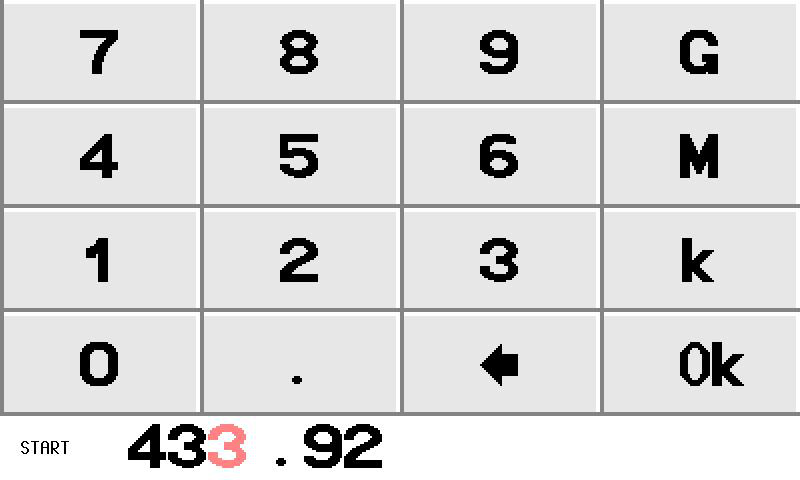
Keyboard Layout
Section titled “Keyboard Layout”The keyboard is a 4-by-4 grid with numeric keys, a decimal point, a backspace arrow, and four terminator keys:
| Col 1 | Col 2 | Col 3 | Col 4 | |
|---|---|---|---|---|
| Row 1 | 7 | 8 | 9 | G |
| Row 2 | 4 | 5 | 6 | M |
| Row 3 | 1 | 2 | 3 | k |
| Row 4 | 0 | . | Backspace | Ok |
Key Functions
Section titled “Key Functions”Numeric Keys (0-9) and Decimal Point
Section titled “Numeric Keys (0-9) and Decimal Point”Standard digit entry. The decimal point (.) inserts a fractional separator. Only one decimal point is accepted per entry.
Backspace
Section titled “Backspace”Deletes the last character from the input field. When the input field is empty, pressing backspace closes the keyboard and cancels the entry.
Unit / Terminator Keys
Section titled “Unit / Terminator Keys”These keys serve a dual purpose: they multiply the entered value by a unit factor and immediately submit the result. You do not need to press Ok after a unit key.
| Key | Multiplier | Typical Use |
|---|---|---|
| G | x 1,000,000,000 | GHz (gigahertz) |
| M | x 1,000,000 | MHz (megahertz) |
| k | x 1,000 | kHz (kilohertz) |
| Ok | x 1 | Enter value as-is (Hz, dB, %, etc.) |
Entry Examples
Section titled “Entry Examples”Frequency Entry
Section titled “Frequency Entry”| Target Frequency | Keystrokes | What Happens |
|---|---|---|
| 100 kHz | 1 0 0 k | 100 x 1,000 = 100,000 Hz |
| 433.92 MHz | 4 3 3 . 9 2 M | 433.92 x 1,000,000 = 433,920,000 Hz |
| 2.4 GHz | 2 . 4 G | 2.4 x 1,000,000,000 = 2,400,000,000 Hz |
| 1 MHz | 1 M | 1 x 1,000,000 = 1,000,000 Hz |
| 50 MHz (long form) | 5 0 0 0 0 0 0 0 Ok | 50,000,000 Hz entered directly |
Non-Frequency Entry
Section titled “Non-Frequency Entry”| Target Value | Context | Keystrokes |
|---|---|---|
| Scale 15 dB/div | DISPLAY > SCALE | 1 5 Ok |
| Ref pos 5 | DISPLAY > REF POS | 5 Ok |
| Velocity factor 70% | TDR > VELOCITY FACTOR | 7 0 Ok |
| E-delay -0.1 ns | CONFIG > E-DELAY | - 0 . 1 Ok |
- Leading zeros are optional. Entering
.5Gis equivalent to0.5Gand sets 500 MHz. - Cancel entry by pressing backspace until the input field is empty, then pressing backspace once more.
- The keyboard closes automatically after any terminator key (
G,M,k,Ok) is pressed. - Negative values are supported for some parameters (e.g., electrical delay). A minus sign (
-) may appear as a separate key when the context requires it. - No confirmation dialog — the value is applied immediately when you press a terminator key. Double-check the display after entry.