
Your First S21 Measurement
An S21 measurement tells you how much signal passes through a device from PORT1 to PORT2 — the “transmission coefficient.” This is the fundamental measurement for characterizing filters, amplifiers, attenuators, cables, and any other two-port device.
What you will need
Section titled “What you will need”- NanoVNA-F V3, charged or USB-powered
- SMA calibration kit (OPEN, SHORT, LOAD)
- SMA-JJ RG405 cable (included) or SMA straight-through adapter
- A two-port device to measure (filter, attenuator, cable, etc.)
Connecting for S21
Section titled “Connecting for S21”The signal path for S21 is straightforward:
PORT1 ---> [Device Under Test] ---> PORT2PORT1 is the signal source (stimulus). PORT2 is the receiver. The NanoVNA measures what fraction of the signal injected at PORT1 arrives at PORT2 after passing through your device.
Step-by-step measurement
Section titled “Step-by-step measurement”-
Set the frequency range
Power on the NanoVNA-F V3 and tap the screen to open the menu. Navigate to STIMULUS and set START and STOP frequencies to cover the operating range of your device with some margin on each side. For example, to measure a 145 MHz bandpass filter, set 100 MHz to 200 MHz.
-
Calibrate with THROUGH
For an accurate S21 measurement, you need a full two-port calibration (OSLT):
- Navigate to CAL and perform OPEN, SHORT, and LOAD on PORT1.
- Then connect PORT1 directly to PORT2 using the SMA-JJ cable or straight-through adapter.
- Tap THROUGH, wait for the beep.
- Tap DONE, then SAVE to a slot.
The calibration status should show “OSLT” characters. See Full Calibration for the complete procedure.
-
Verify the calibration
With PORT1 and PORT2 still connected through the cable or adapter (the THROUGH path), the S21 LOGMAG trace should read approximately 0 dB across the entire span. This confirms the system sees a lossless through path.
-
Connect the device under test
Remove the THROUGH connection and insert your device between PORT1 and PORT2. The sweep updates in real time.
-
Select the S21 trace
If the display is not already showing S21, navigate to DISPLAY then TRACE and activate a trace assigned to S21. Set the format to LOGMAG for insertion loss readings.
Reading the S21 LOGMAG trace
Section titled “Reading the S21 LOGMAG trace”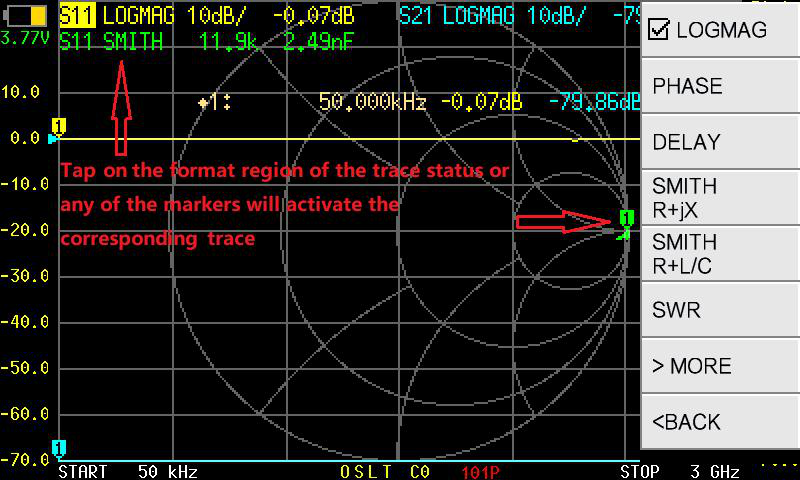
The S21 LOGMAG trace shows gain or loss in dB:
| S21 Value | Meaning |
|---|---|
| 0 dB | No loss — all signal passes through |
| -1 dB | Slight loss (typical for short cables, good connectors) |
| -3 dB | Half the power is lost (the “3 dB point” used to define filter bandwidth) |
| -10 dB | 90% of power is lost |
| -20 dB | 99% of power is lost |
| -40 dB | Strong rejection (good stopband performance) |
Using markers to find key values
Section titled “Using markers to find key values”-
Tap the screen and navigate to MARKER, then select MARKER 1.
-
Use SEARCH then MAXIMUM to jump the marker to the peak of the passband (the point of lowest insertion loss).
-
Note the frequency and the dB value shown in the marker readout.
-
To find the -3 dB bandwidth of a filter, you can set the reference level to the passband peak, then manually move additional markers to the frequencies where the trace drops 3 dB below the peak. Or use MARKER 2 and MARKER 3 with the SEARCH LEFT and SEARCH RIGHT functions.
Common two-port measurements
Section titled “Common two-port measurements”For bandpass, lowpass, or highpass filters, look for:
- Passband insertion loss: the flattest, highest region of the S21 trace. Lower loss is better.
- Bandwidth: the frequency range where S21 stays within 3 dB of the peak.
- Stopband rejection: how far below 0 dB the trace drops outside the passband. More negative is better isolation.
See Measuring a Filter for a full walkthrough.
For coaxial cables, S21 shows the total loss at each frequency. Cable loss increases with frequency. A short, high-quality cable might show -0.5 dB at 100 MHz and -2 dB at 1 GHz.
A fixed attenuator should show a flat S21 trace across frequency, close to its rated value (e.g., -6 dB, -10 dB, -20 dB). Deviations from flat indicate the attenuator is not performing to spec at those frequencies.
Troubleshooting
Section titled “Troubleshooting”S21 reads much lower than expected (extra loss)
- Check all connector tightness. Loose SMA connections can introduce several dB of loss.
- Verify you calibrated with the same cables you are using for the measurement.
- Make sure the device is oriented correctly (input to PORT1, output to PORT2).
S21 reads 0 dB everywhere
- The DUT may not be in the signal path. Check that the device is actually connected between the ports and not being bypassed.
Trace is very noisy below -50 dB
- This is the noise floor of the instrument. The NanoVNA-F V3 dynamic range is finite. Readings below about -50 to -70 dB (depending on frequency) are in the noise.
Next steps
Section titled “Next steps”- Reading the Display — learn what every part of the screen means
- Measuring a Filter — a detailed practical project
- Full Calibration — the complete calibration procedure